
Watching videos is everyone’s favorite pastime on the Internet. Everyone has a favorite place to watch videos, Youtube, MegaVideo, MetaCafe, Daily Motion, Veoh, Vimeo and the likes, but watching videos on the respective sites may be a problem if you have a slow Internet connection.
Wouldn’t it be great to first download those videos then watch it like you would a full movie, without interruptions? Having a video marathon weekend to help you distress, or to store up as a personal collection. The site doesn’t have a built-in download feature but that doesn’t matter because we’ve accumulated 16 Ways to download your favourite online videos for almost every possible platform.
Download online videos via web services:
KeepVid
KeepVid is quite simple to use. Just enter the video URL (video’s page address) and click the Download button. You will then be shown the various formats the video can be downloaded in, along with their download links.
Click on the appropriate link and the video will get downloaded. You can use it for Youtube, DailyMotion, Google Video, Vimeo etc. It also has a KeepVid program you can download for Windows but you need to buy a license to activate its use.
 |
| Download Online Videos |
ClipNabber
ClipNabber is an online tool to download videos. It’s available in various International languages. The process of downloading videos from ClipNabber is same as others: enter the video’s page address in the input field and click the Nab! Button.
|

You’ll see the various formats the video can be downloaded in. Choose your favourite format and start downloading the video.
SaveFrom.net
SaveFrom.net Helper is an online tool and a browser extension which helps people download videos from various sites. Having this extension installed in your browser, you only need to open the video’s page and click on the extension button (present near top-right of the browser).
It will open a new page with the video’s download links in various formats. It’s available on the Web and for:
|

YouTube5
(Safari) YouTube5 is a downloader for the Safari browser which changes the default YouTube player, and enhances the video experience by providing some cool features like volume control button, ability to switch resolutions within the player, downloading videos, etc.
You can download the videos by clicking on the required video resolution shown in the player.
|

Video DownloadHelper
(Firefox) DownloadHelper is a Firefox addon which allows you to download videos and images from many sites including YouTube, Google Videos, DailyMotion, etc. It can also convert downloaded videos to your preferred format.
When DownloadHelper feels that a site has content that can be downloaded, its icon animates and you can click the icon and choose the appropriate optionfrom the menu.
Easy YouTube Video Downloader
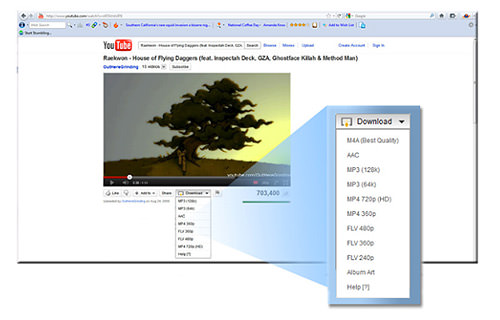
(Firefox) Easy YouTube Video Downloader is another Firefox addon with fewer but necessary features to download YouTube videos. Its icon comes under the YouTube video which shows a menu of available (downloadable) video formats. Choose the one you need and the download will start.
| Download Online Videos |
FVD Suite
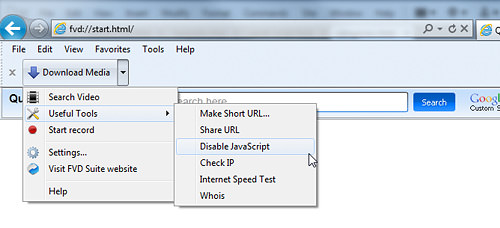
(Internet Explorer) A YouTube video downloader for Internet Explorer, FVD Suite adds a button to the toolbar of the browser.
(Internet Explorer) A YouTube video downloader for Internet Explorer, FVD Suite adds a button to the toolbar of the browser.
Downloading videos become easy: open the video page and click the button. Choose the format and enjoy watching the downloaded video.
| Download Online Videos |
Video Download
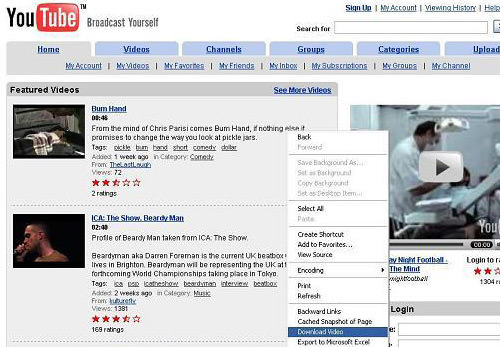
(Internet Explorer) Video Download, another downloader for Internet Explorer, adds an option straight in the (right-click) context menu.
Downloading videos is just a mere right-click on any video link. Then, all you have to do is choose the option to download that video.
| Download Online Videos |
Download Online Videos from Computer:
Are you a heavy downloader of videos from YouTube or from any other video sites out there? Check out the desktop downloaders that will be able to meet most, if not all, of your video downloading needs.
YTD Video Downloader
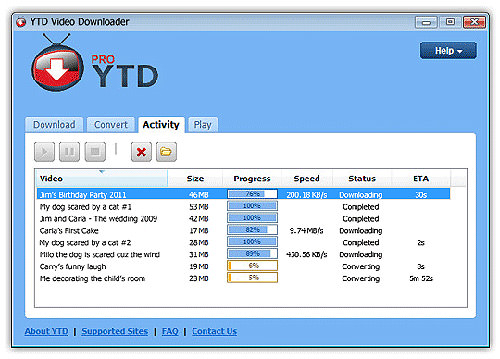
(Win) This video downloader is a tool for downloading videos from more than 60 video sites including YouTube. You just need to paste the video’s URL in the input field and choose the download quality (or format) and click the Downloadbutton.
It can even convert the downloaded videos into various video formats. It’s available for Windows.
| Download Online Videos |
Fastest YouTube Downloader
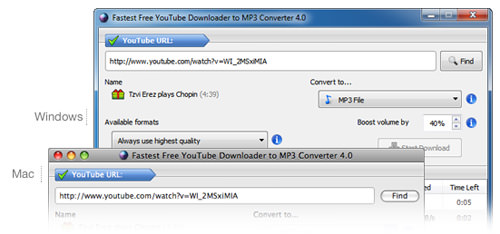
(Win, Mac) In need for speed when it comes to downloads? Then, you should give this a shot. This is a YouTube downloader which claims that it can download, for a premium price, 100x faster than normal download speeds.
It can download videos and convert them to MP3 or various video formats of your choice. There is also a professional version and a free version. It’s available for Windows and Mac OS.
Download Online Videos from mobile devices:
Downloads are no longer only for desktops or laptops. You can also download videos to watch on your tablets and smartphones.
Snaptube
SnapTube-YouTube Downloader is a simple tool to download any video from YouTube in a simple, fast, and convenient way so you can play it later without an Internet connection. It's important to note that Youtube downloads are restricted from within USA and China.
This app has several search options, including a catalog with 11 subcategories, a section for popular videos, a section for videos with the most views, plus another with daily recommendations.
Browsing is as simple as clicking any category or video or typing the name of the artist or song in the search bar. Once you find what you're looking for, you can play the video or download it directly to your device.
You can choose the quality of the download to save space on your phone's memory. You can also choose to download only the audio, which is useful when you just want to save a song or an album. Recent updates also allow the download of Facebook and Instagram videos.
In addition to downloading audio and video, you can use SnapTube-YouTube Downloader to manage your channel just like on the YouTube app, meaning you can use this app instead of the official one while downloading videos, to boot.
Snaptube is a video downloader for Android that launched in November, 2014. Right now it’s available in popular app stores like Uptodown.com, Aptoide.com, and UC 9Apps store.
TubeBox
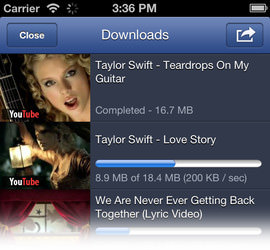
(iOS) TubeBox is a full feature iOS client for YouTube and DailyMotion. If you enjoy watching videos on these two sites, then you’ll become a fan of TubeBox too.
TubeBox lets you download YouTube videos directly into your iPhone or iPad. More over, it supports background playback, HD formats, and offline video playing.
TubeMate
(Android) TubeMate is a YouTube downloader for the Android platform. Using TubeMate, you can easily search and download YouTube videos right on your Android device without the need of a PC. This app is simple and easy to use.

WonTube
(Android) WonTube can be used to download YouTube videos on your Android phone or tablet. WonTube comes with an in-app browser where you can browse YouTube videos and search videos. To download a video, open the video’s page in WonTube and click the download button.

Tags:
Free Downloads